Student GIS Projects

I’ve been teaching the Introduction to Geographic Information Systems (GIS) class in the Earth, Environmental, and Sustainability Sciences (EESS) Department for about 11 years. Suresh Muthukrishnan (department chair) also teaches the course. I’ve learned a ton from him. Here are some things I really enjoy about teaching the course:

House flipping hotspots near the Cincinnati Streetcar route. An example map from student Charlotte Moore.
  • Interdisciplinary Nature – Students from across campus take the course. Of course, there are lots of EESS majors. However, even those projects run the gamut. Projects like geologic mapping, landslide risk, sustainable farming, and even mapping data from GPS collars on mountain lions. But students of history, economics, sociology, computer science, business, and music also come up with some great projects.
  • The Opportunity to Learn – Every semester, students will come up with novel questions and methods. I think my typical response is, “I haven’t done that before, but I know it’s possible. Let’s figure it out together.” So I learn something new about GIS, as well as all the topics above, each time I teach.
  • Community Connections – Many of the projects involve community partners–folks like the Greer Police Department, Upstate Warrior Solution (which serves veterans), Greenlink (our public transportation department), local land conservation non-profits, the forestry department, and community associations. Our first deep partnership involved mapping streetlights, which I’ll talk about in another post.
  • Working with Our Post-Baccalaureate Fellows (postbacs) – I’m grateful to get to work with two recent Furman graduates who are on our team. Catherine Lippert (Sustainability Science) and Sam Hayes (History and Politics and International Affairs) are an integral part of teaching the course. They have serious GIS chops and roll up their sleeves to help the students with projects, every step of the way.
  • Project-Based Learning – The course involves a semester-long project. It’s a real challenge to teach GIS principles, create meaningful labs, AND support students as they use these concepts and tools to apply what they’ve learned to address a real-world problem. Every semester I think, “We took on too much. This isn’t going to happen.” But it always comes together. Here’s the syllabus for the class.
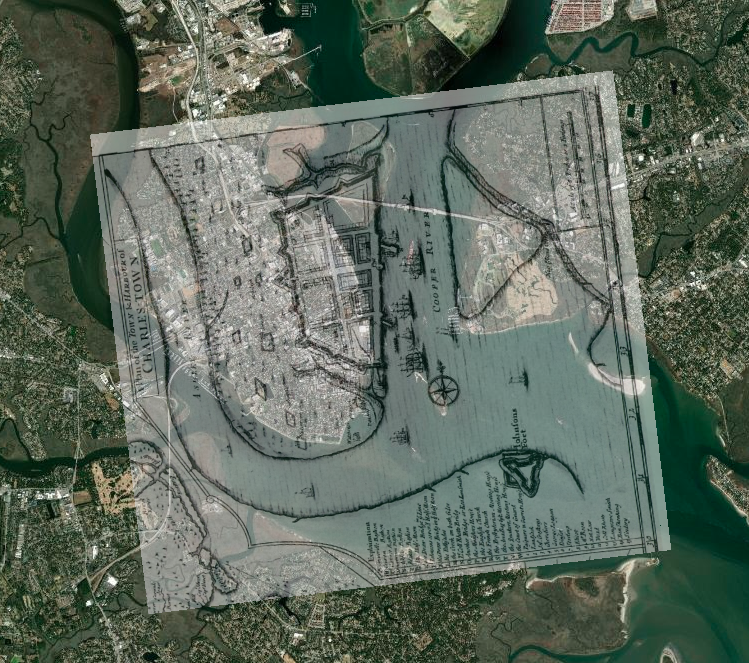
An historic, georeferenced map of Charleston Harbor (1711). From a student project by Kylie Gambrill.

Here are some examples from a recent class. I don’t want to make it seem like I’m taking credit for these. The students did the work. Catherine, Sam, and I were teammates. However, the examples are illustrative of the range of projects that are possible. The projects are easier to share, now that we have switched the delivery format from poster presentations to StoryMaps.

Charlotte Moore: Transit-Motivated Gentrification: An analysis of gentrification in Over-the-Rhine, especially as a result of the Cincinnati Streetcar.

Caroline Vickery: Contextualizing Upstate Farms: A preliminary examination of land use and nutrient loading for small farms in the Upstate of South Carolina.

Kylie Gambrill: Understanding Change: The Charleston Harbor — Our perceptions of the environment around us depend upon the cultural context we find ourselves in.

Bennett Dean: Affordable housing and public transportation in Greenville.

 Chloe Sandifer-Stech: Recommendations for green space around Enoree Career Center: A study of the influence of tree density on carbon storage.

Jake Gerardi: Land Sparing/Sharing Impacts on Birds: Assessing habitat quality of southern bird species using ecological principles in Greenville watersheds.

Madison Eichhorn: Affordable Housing & Good Jobs – An evaluation of proximity, density, and availability of affordable housing and employment.

Austyn Feigenbaum: Boating Safety Zones and Florida Manatees: An investigation on the relationship between manatee death rates and boating safety zones along the coast of Florida.

I hope you’ve enjoyed seeing the range of student projects and learning more. It’s a pleasure to see all the hard work result in such great studies and stories.
Reflecting on Projects

Partnership with United Way of Greenville County: Neighborhood Assessment

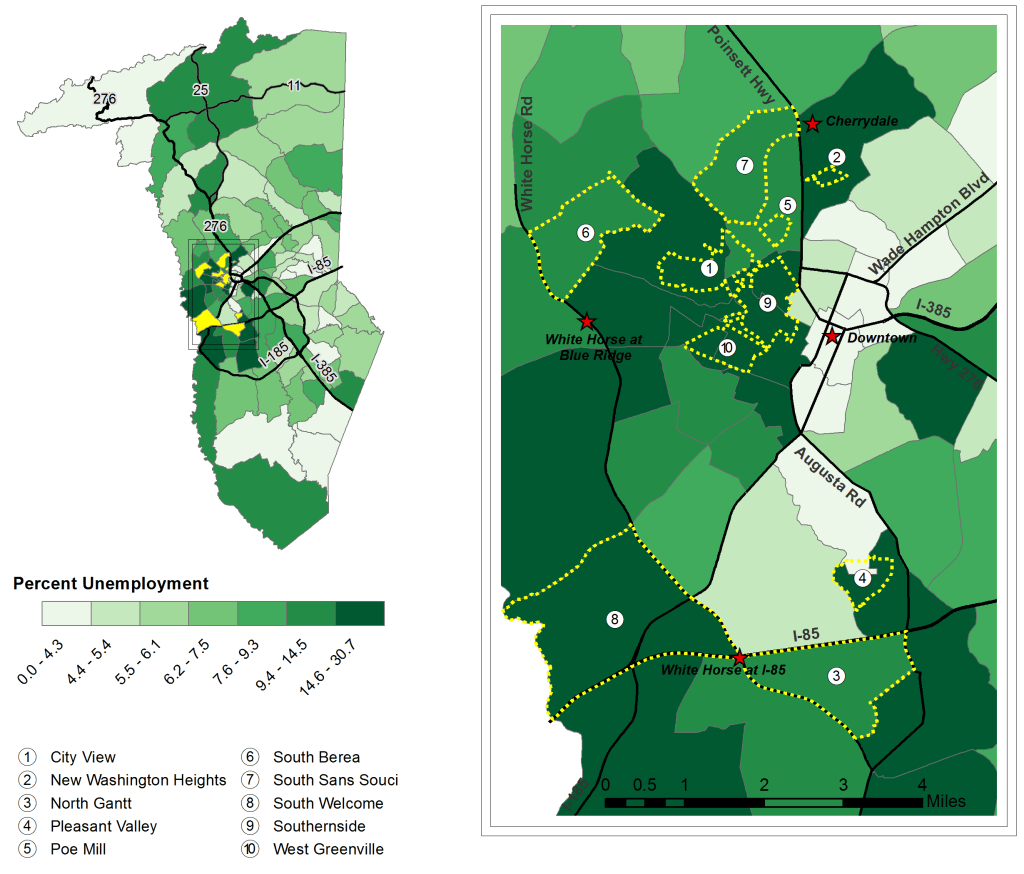
Percent Unemployment: Greenville County and Ten Focus Neighborhoods.

I’ve been going through the course, Visualization for Clarity, on the FlowingData website. I’ve learned a great deal and decided to use it as an opportunity to go back through previous work and projects to analyze what we did right and what we could have done differently. 

  1. Firstly, I wanted to put highlights from the projects in one place. Some of these resources are difficult to find. So I wanted to pull them together in one place. So that’s a question for action: How do we make our work easier to find, so that the information can be leveraged for positive change? See the full report and executive summary for details on this project.
  2. I hope this exercise will prompt me to reflect on our work. I say ‘our’ because almost all of the work I’ve done has been with teams. Although I like to hole up and make maps and other visualizations myself (usually playing punk music and drinking homemade cold-brew coffee), I love working in teams. Part of it is selfish; I just learn so much by working with others.
  3. The last reason is professional. It’s difficult to share this kind of work in a CV/Resume. I want to get it out there–get feedback from a broader audience and connect more deeply with a GIS / DataViz community.

So here’s one from the recent past.

Project Title: Focused Needs and Assets Assessment – Greenville County, SC

Team members: See the list in the report. It was a big, team effort. 

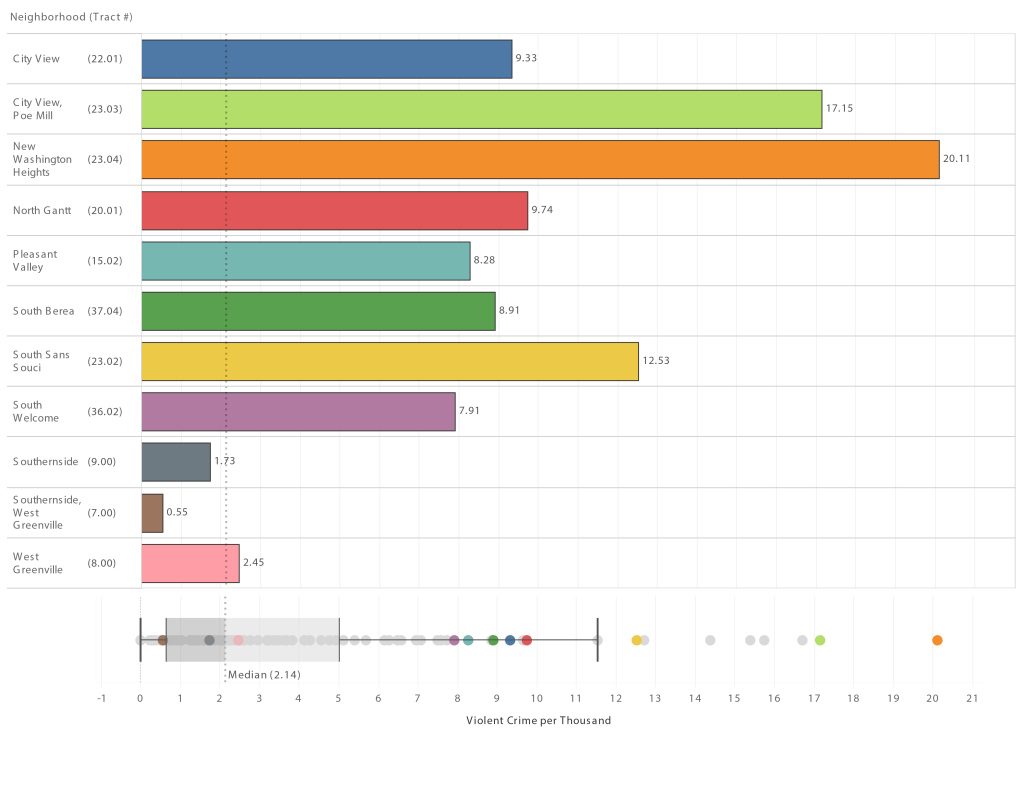
Violent Crime in Ten Study Neighborhoods: Data from Greenville Police Department.

Summary: 

  • We focused on 10 neighborhoods with the highest family poverty rates in Greenville County. This focus was determined in collaboration with the United Way of Greenville County. 
  • We then sent teams of qualitative researchers, including students, into these neighborhoods to better understand assets and needs. That team met with 268 neighborhood stakeholders! We wanted to make sure to focus on assets just as much, or more, than needs. As you can probably guess, these varied greatly from neighborhood to neighborhood.
  • Our team mapped and graphed 35 measures of community well-being, highlighting each of the ten neighborhoods. 
  • Because of United Way’s focus on a cycle of success, particularly third-grade reading scores, our team re-aggregated the data to local school attendance zones to analyze explanatory variables for reading scores. See the full report or executive summary. The most interesting one to me was the potential role in communities with high alternative workshift rates (e.g., second-shift, third-shift, etc.). Professor John Quinn took the lead on this analysis. 

Tools used for visualizations, maps, and modeling:

  • ArcGIS Desktop
  • QGIS
  • R
  • Tableau
Financial Measures Broken Down by Neighborhood and Tract Number. Darker Green Shows Higher Percentage or Dollar Amount.

Visualization Reflection:

The good

  • I think we did a great job with maps and visuals, e.g., color choices, visual hierarchy, highlighting local landmarks, and other map-making best practices.
  • I also like the tables for the measures of well-being (see above). Sometimes tables are better than a fancy visualization. This is a good example. The color shading in the table really draws the eye towards certain neighborhoods.
  • I really like the asset and need visualizations in the executive summary (see below). This was Dr. Matt Cohen’s idea. We implemented that with Tableau.
Community Assets. Identified by Community Members and Stakeholders.

Opportunities for Improvement:

  • Interactivity – It drives me a bit crazy when great information isn’t interactive. We locked this into PDF format for the report. In our defense, we had limited time and budget, so we decided not to pursue interactive platforms like Tableau Server and ArcGIS Online. We fixed that in future projects. How cool would it have been to have to be able to hover over a particular neighborhood and see it highlighted in our box and whisker plot? I could do that in Tableau Desktop, but it would have been helpful for our stakeholders to do that too. 
  • Updatability – We put a lot of work into pulling data in tabular form, cleaning it up, re-aggregating it to non-standard boundaries. Now the data is stale. We need to take a step back and explore ways to develop frameworks that allow us to “slide” new data underneath (like new ACS estimates) and have maps and graphs auto-update.

An unplanned semester online:

Like my students, I’m struggling with the shift to online. I’ve used screencasts (short recorded lectures) previously, but I’m re-evaluating. I like them because they are a compact way of sharing content and context. Most are in the 7 – 20 minute range. But here are the challenges:

1. Time to produce – I know it’s hard to believe, but this one took me about 4 hours to a) get the data wrangled 2) put together an outline 3) record, and 4) edit. So I, either suck at this, or my experience is indicative of other instructors’ experience. I’m open to the former.

https://furman.box.com/s/no1ui4cwbwnrud6vuqm02q10kk1zrppm

2. Time in-class vs. online lecture – This would have taken 2x the time to discuss in class. The presentation wouldn’t have been as tight, and student questions/discussions would have extended the time. But is that “time gain” a good thing, or indicative that something is missing online?

3. Lecturing to no one – You might hear it in my voice, but it’s hard to lecture to an imagined audience. I try to envision my students, and I’ve even stood up to produce the screencast with more energy, but recreating the in-person experience is tough. I miss them.

4. The long term – I think I can use these screencasts, which are primarily information dissemination and demonstrations, to make space in my class for more interaction and discussion. However, that’s going to have to happen in person, or it’s one more thing to figure out how to do online. Zoom breakout groups are great, but are they the same thing as in-person discussions?

Some questions:

  1. Do you find that developing screencasts is worth the time?
  2. A similar, live lecture via Zoom is going to take longer, but is the interactivity worth it?
  3. How do you use short screencasts to make room for my interactivity during synchronous meetings, whether online or in-person?
  4. What went well online this semester? What were the challenges?


Lessons from 1918

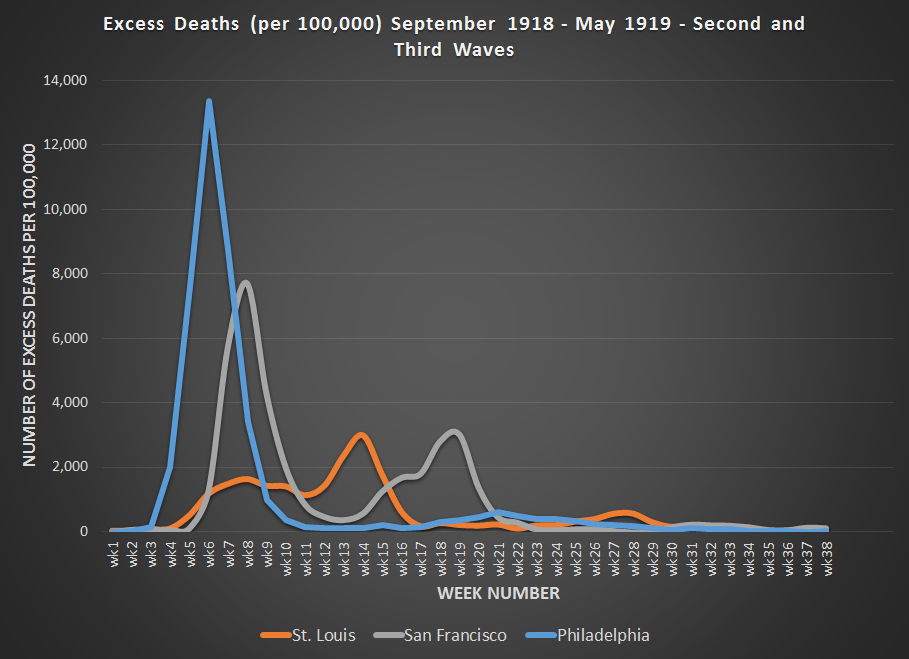
After reading this article about how different cities handled the 1918-19 flu pandemic, I decided to get the data graph it. You can see the impact, and the result of St. Louis and San Francisco letting their guard down too early—despite stronger responses in the early phases.  It appears SF likely overestimated the effectiveness of masks in preventing the spread of this particular virus.

I realize the that virus and Covid-19 are different, but perhaps there’s still a lesson to be learned from history.

Philadelphia (1918) – It’s just like the regular flu. Just keep your feet dry and your bowels open. We’re not canceling the parade.

St. Louis (1918) – This is serious. Avoid crowds. Treat people in their homes if possible. Act early.

San Francisco (1918) – This is serious. Implement social distancing. Wear masks.  

Data source below:

Collins, S. D., Frost, W. H., Gover, M., & Sydenstricker, E. (1930). Mortality from influenza and pneumonia in 50 large cities of the United States, 1910-1929. Ann Arbor, Michigan: Michigan Publishing, University Library, University of Michigan.

GIS and Social Justice

At a recent faculty gathering on community engagement, I was asked to provide some examples of how Geographic Information Systems (GIS) is being used to support different social justice initiatives. While there are many examples, I didn’t have much time to share, so I highlighted just a few compelling examples, which are shown below.

If you’re interested in learning more about GIS and social justice, these resources are a great place to start, although I find the inequity that the maps reveal to be very disheartening.

New Orleans
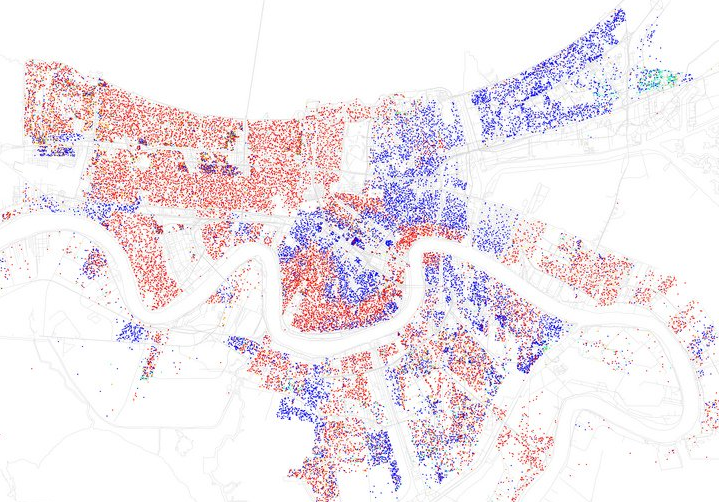
New Orleans, LA from Business Insider – http://www.businessinsider.com/most-segregated-cities-census-maps-2013-4?op=1

  1. The Revolution Will Be Mapped – This article gives an overview and describes some recent cases in which maps played a key role in highlighting discriminatory practices in the provision of public services.
  2. Redlining Maps –If you click on an area, especially those in red, you can see the disturbing (stunning, actually) area descriptions–circa 1930.
  3. Million Dollar Blocks – NPR highlighted the Justice Mapping Center’s work on visually representing incarceration rates and costs. Million dollar blocks are “areas where more than $1 million is being spent annually to incarcerate the residents of a single census block.” The maps are being used to identify areas for establishment of re-entry programs. You can check out data for Greenville County by zip code and census block here. Click on the state, then the county for details.
  4. Maps of Highly Segregated Cities – Each map provides a dissimilarity index. “A score above 60 on the dissimilarity index is considered very high segregation.” The symbology is very powerful. For New Orleans, you can clearly see the high elevation area along the river that geographer Richard Campanella refers to as the “white teapot.”
  5. Underbounding – I happened upon this term while doing a little research for the session. This is a practice by which certain groups (usually poor minorities) are excluded from annexation and associated services.
  6. Dividing Lines: School Districts in the US – This map shows how current educational funding practices limit fair access.
  7. Social Explorer – Our library is currently evaluating a subscription to Social Explorer, which should make it much easier to use the browser to map demographic data going all the way back to the 1790 Census. No desktop software required.

Elevation Profle and Google Earth

I took a field trip with a colleague who is headed to Guatemala in a couple of days in order to test the elevation accuracy of the iPhone, iPad, and Trimble Nomad.  I’ll post the results shortly.  I discovered a feature in Google Earth that I didn’t know existed–the elevation profile.  After adding a track we recorded of our hike back using MotionX HD on the iPad to Google Earth, it was easy to create an interactive elevation profile of the short trip.  The yellow arrows show the point-of-interest on the path and the corresponding location on the elevation profile.  Pretty cool!


Visualizing the World – Wow!

This is a really powerful tool for viewing global statistics that might be useful for class.  The visualizations in Hans Rosling’s presentation  are pretty amazing.

Motion Map

The tool Rosling uses in the presentation is available online (along with his blog).  It took me a little while to figure it out how to use it, but experimentation with the maps and charts, along with the video tutorial, really helped me realize how much is here.

Indicators include health, economic, education, environmental, and more data from the UN.

The site also provides information about how you can use Google Spreadsheets to make your own motion charts.  I experimented, and the process is fairly straight-forward for charts but doesn’t include the mapping piece, which is available for the UN data on Rosling’s site.

oil_consumption.jpg

Total Oil Consumption – Let’s get on those bikes or carpool America 🙂

Geospatial Revolution Project

Now that spring semester is over, I’m hoping to pick up my blogging pace again. Penn State University announced the geospatial revolution project recently, which involves the creation of video episodes to explain the importance and role of geospatial technologies in our world. Check out the trailer below. This looks intriguing!

Whenever I try to articulate my excitement about the power of geospatial technologies for learning across the curriculum, I’m usually disappointed in my ability to convey the message. It looks like these episodes might do a much better job of highlighting that connection. I’m currently taking GIS courses through Penn State’s online program, so I recognize at least one of the interviewees in the clip!


Campus Technology Award

Our project using Google Earth to connect Boston, NY, and Greenville in Lloyd Benson’s Urban History class won an Annual Campus Technology Award. Check it out!

Here’s a little bit more info on the project that I put together for a NITLE conference this spring.

 google_earth_tour.gif

Project FAQs

It’s amazing how quickly things change. Picasa and Flickr now automatically put geocoded images on the map. For Flickr you have to make sure this is set to ‘yes’ in the privacy and permissions section of your profile.

flickr

Here’s an example of an image in Picasa that is automatically placed on the map. I took it with an iPAQ with built-in GPS. I almost walked right through the web when getting out of my car. That would have been interesting! It reminds me of the time I put my kayak on my head to carry it, and a big spider that had set up camp started falling towards my face. I closed my mouth just in time!

spider

Costa Rica Day 6 and home

See flickr for all the pics from the trip.

Got up early to go with a crew over to Firestone. They were casting nets to catch leaf litter for another study on the property. I caught up with some email and talked to Susannah briefly before heading back for more GIS instruction. I really learned a lot. Warren is a great teacher and very patient with all of us. We turned data we gathered with the clinometers and compasses into latitude and longitude using start and finish anchor points we took with the portable GPS devices and COMPASS software. Then we imported all the data from the surveys we had done to see the additional trail maps. It was way cool! All of the points help GIS interpolate elevation, slope, and aspect information, so we get a better handle on both the Hacienda Baru and Firestone property.

eric mapping

I took a quick walk by myself on the trail to the playa (beach). We ate a quick lunch, packed, and took a different route back to San Jose. This road was paved, but very curvy, with some drops that were pretty impressive. I was happy for dramamine and decided it wasn’t worth watching all the crazy passing we were doing on hair-pin turns.

Carol on steep cliff

We stopped at a little over 8,000 ft on the way up and climbed a peak for some great views (see flickr). On the way back into the bus, we ran into a young guy from Japan who had biked from Calgary Canada!! He was looking for a place to pitch a tent for the night. He seemed to be in great spirits for such a long uphill ride with crazy traffic all around.

Mike and Jose Luis

We went out for dinner in San Jose, which is hopping in the evening. Jose-Luis and I (picture above) crossed a street and got stuck in the middle of the road. No one let us go and just honked and whizzed past. I later asked Eric to teach me how to curse in Spanish. I have a couple of phrases in my back pocket that might serve me well in the future 😉 I’m on the plane home to Atlanta, then I drive back to Greenville. Can’t wait to be home, but it was a great trip!