Partnership with United Way of Greenville County: Neighborhood Assessment
I’ve been going through the course, Visualization for Clarity, on the FlowingData website. I’ve learned a great deal and decided to use it as an opportunity to go back through previous work and projects to analyze what we did right and what we could have done differently.
- Firstly, I wanted to put highlights from the projects in one place. Some of these resources are difficult to find. So I wanted to pull them together in one place. So that’s a question for action: How do we make our work easier to find, so that the information can be leveraged for positive change? See the full report and executive summary for details on this project.
- I hope this exercise will prompt me to reflect on our work. I say ‘our’ because almost all of the work I’ve done has been with teams. Although I like to hole up and make maps and other visualizations myself (usually playing punk music and drinking homemade cold-brew coffee), I love working in teams. Part of it is selfish; I just learn so much by working with others.
- The last reason is professional. It’s difficult to share this kind of work in a CV/Resume. I want to get it out there–get feedback from a broader audience and connect more deeply with a GIS / DataViz community.
So here’s one from the recent past.
Project Title: Focused Needs and Assets Assessment – Greenville County, SC
Team members: See the list in the report. It was a big, team effort.
Summary:
- We focused on 10 neighborhoods with the highest family poverty rates in Greenville County. This focus was determined in collaboration with the United Way of Greenville County.
- We then sent teams of qualitative researchers, including students, into these neighborhoods to better understand assets and needs. That team met with 268 neighborhood stakeholders! We wanted to make sure to focus on assets just as much, or more, than needs. As you can probably guess, these varied greatly from neighborhood to neighborhood.
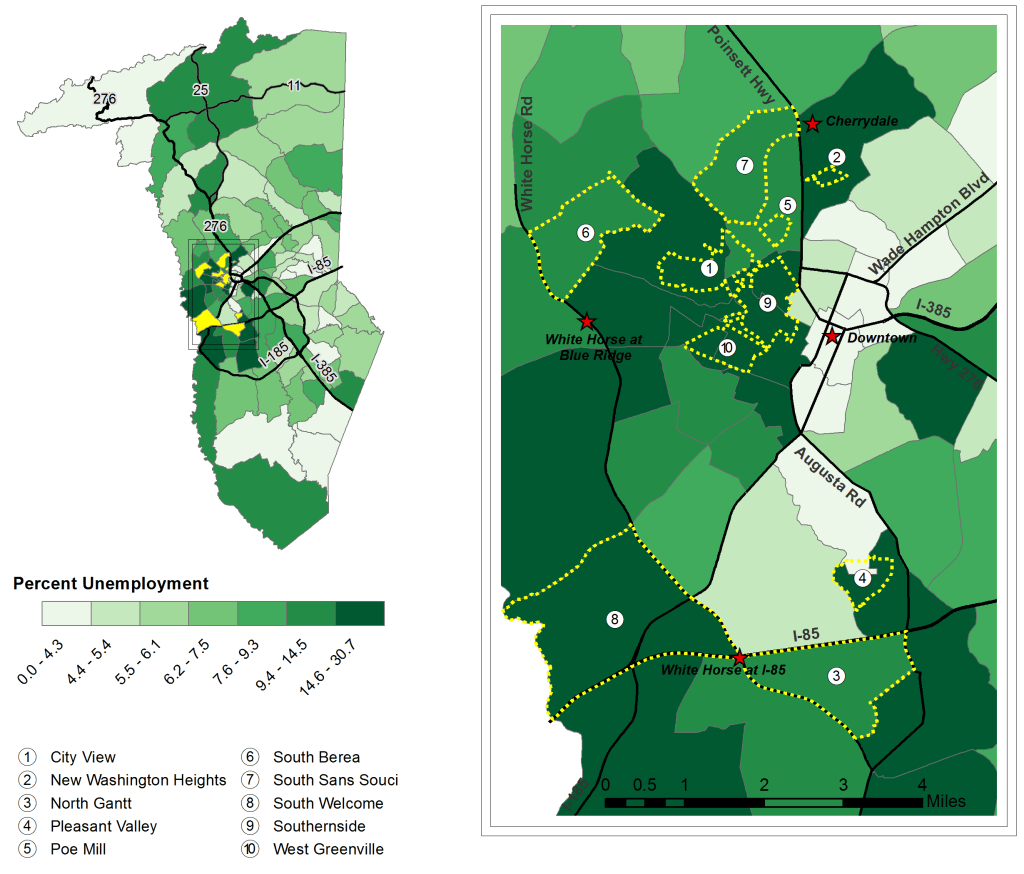
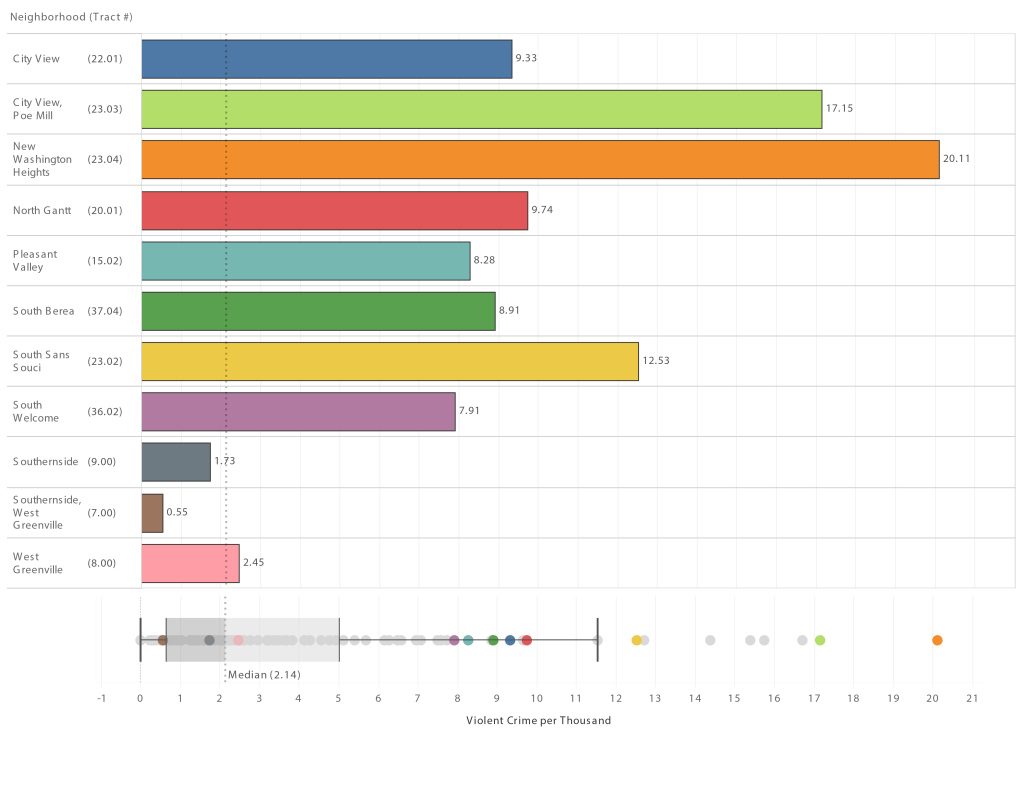
- Our team mapped and graphed 35 measures of community well-being, highlighting each of the ten neighborhoods.
- Because of United Way’s focus on a cycle of success, particularly third-grade reading scores, our team re-aggregated the data to local school attendance zones to analyze explanatory variables for reading scores. See the full report or executive summary. The most interesting one to me was the potential role in communities with high alternative workshift rates (e.g., second-shift, third-shift, etc.). Professor John Quinn took the lead on this analysis.
Tools used for visualizations, maps, and modeling:
- ArcGIS Desktop
- QGIS
- R
- Tableau

Visualization Reflection:
The good
- I think we did a great job with maps and visuals, e.g., color choices, visual hierarchy, highlighting local landmarks, and other map-making best practices.
- I also like the tables for the measures of well-being (see above). Sometimes tables are better than a fancy visualization. This is a good example. The color shading in the table really draws the eye towards certain neighborhoods.
- I really like the asset and need visualizations in the executive summary (see below). This was Dr. Matt Cohen’s idea. We implemented that with Tableau.

Opportunities for Improvement:
- Interactivity – It drives me a bit crazy when great information isn’t interactive. We locked this into PDF format for the report. In our defense, we had limited time and budget, so we decided not to pursue interactive platforms like Tableau Server and ArcGIS Online. We fixed that in future projects. How cool would it have been to have to be able to hover over a particular neighborhood and see it highlighted in our box and whisker plot? I could do that in Tableau Desktop, but it would have been helpful for our stakeholders to do that too.
- Updatability – We put a lot of work into pulling data in tabular form, cleaning it up, re-aggregating it to non-standard boundaries. Now the data is stale. We need to take a step back and explore ways to develop frameworks that allow us to “slide” new data underneath (like new ACS estimates) and have maps and graphs auto-update.

 GIS, Data Visualization, and Teaching